Nextcloud PHP debugging with Xdebug in Zed editor
I started to switch from PhpStorm to Zed as IDE recently as Zed is open source and has a much smaller footprint and is more slick than PhpStorm.
One thing that I didn't get running immediately was Xdebug integration, so I did a bit of research and asked Claude for help. Here's a quick writeup of how to get it running.
I have Zed installed as Flatpak on a Debian Trixie host system.
The PHP process runs in a nextcloud-docker-dev Docker container.
Install Zed and configure debugging there
Install Zed: flatpak install flathub dev.zed.Zed
In Zed: open the Extensions view and install PHP.
Configure the debugger:
Create ~/.var/app/dev.zed.Zed/config/zed/debug.json:
[
  {
    "label": "PHP: Listen to Xdebug",
    "adapter": "Xdebug",
    "request": "launch",
    "port": 9003,
    "pathMappings": {
      "/var/www/html":             "/home/<user>/devel/nextcloud/server",
      "/var/www/html/apps-extra":  "/home/<user>/devel/nextcloud/server/apps-extra",
      "/var/www/html/apps-shared": "/home/<user>/devel/nextcloud/apps-shared"
    }
  }
]
Add one entry per bind-mounted app directory.
After creating the file, restart Zed.
Inside Zed, select "debugger: start" from command palette and then "PHP: Listen to Xdebug".
Verify Zed is listening. Running ss -tlnp | grep 9003 on the host should show *:9003 with Zed as the process.
Configure Xdebug inside the container
/usr/local/etc/php/conf.d/xdebug.ini:
xdebug.mode = debug
xdebug.idekey = PHPSTORM
xdebug.trace_output_name=trace.%R.%u
xdebug.profiler_output_name=profile.%R.%u
xdebug.output_dir=/shared/xdebug

xdebug.log = /var/log/xdebug.log
xdebug.log_level = 3

; Try to discover the client host, otherwise fall back to the docker host
xdebug.discover_client_host=true
xdebug.client_host=host.docker.internal

; When you cannot specify a trigger, use "xdebug.start_with_request = yes" to autostart debugging for all requests
; https://xdebug.org/docs/all_settings#start_with_request
xdebug.start_with_request = trigger

; Set xdebug.mode trace to use this
; More details at https://derickrethans.nl/flamboyant-flamegraphs.html
xdebug.trace_format=3
xdebug.trace_output_name=xdebug.%R.%u
Apply changes by restarting apache in the container: apache2ctl -k graceful
Notes:
host.docker.internalresolves on Linux Docker only if the container was started with--add-host=host.docker.internal:host-gateway(nextcloud-docker-dev already does this).discover_client_host = truemakes xdebug followX-Forwarded-For- useful behind Nextcloud's dev reverse proxy.
Test xdebug with a PHP command inside the container
Run XDEBUG_SESSION=PHPSTORM php occ status inside the container and check /var/log/xdebug.log.
Install the browser extension
Install Xdebug Helper (Firefox/Chrome). In its preferences, set the IDE Key to PhpStorm. It will set the XDEBUG_SESSION cookie when toggled to Debug.
Click the Xdebug Helper icon in the browser and set it to Debug.
Test Xdebug with browser extension
Load the URL that exercises the code path with the breakpoint. Zed should stop the code exection at the breakpoint.
Introducing cryptsetup-suspend
Today, we're introducing cryptsetup-suspend, whose job is to protect the content of your harddrives while the system is sleeping.
TL;DR:
- You can lock your encrypted harddrives during suspend mode by installing
cryptsetup-suspend - For
cryptsetup-suspendto work properly, at least Linux kernel 5.6 is required - We hope that in a bright future, everything will be available out-of-the-box in Debian and it's derivatives
Before:

After:

Table of contents
What does this mean and why should you care about it?
If you don't use full-disk encryption, don't read any further. Instead, think about, what will happen if you lose your notebook on the train, a random person picks it up and browses through all your personal pictures, e-mails, and tax records. Then encrypt your system and come back.
If you believe full-disk encryption is necessary, you might know that it only works when your machine is powered off. Once you turn on the machine and decrypt your harddrive, your encryption key stays in RAM and can potentially be extracted by malicious software or physical access. Even if these attacks are non-trivial, it's enough to worry about. If an attacker is able to extract your disk encryption keys from memory, they're able to read the content of your disk in return.
Sadly, in 2020, we hardly power off our laptops anymore. The sleep mode, also known as "suspend mode", is just too convenient. Just close the lid to freeze the system state and lift it anytime later in order to continue. Well, convenience usually comes with a cost: during suspend mode, your system memory is kept powered, all your data - including your encryption keys - stays there, waiting to be extracted by a malicious person. Unfortunately, there are practical attacks to extract the data of your powered memory.
Cryptsetup-suspend expands the protection of your full-disk encryption to all those times when your computer sleeps in suspend mode. Cryptsetup-suspend utilizes the suspend feature of LUKS volumes and integrates it with your Debian system. Encryption keys are evicted from memory before suspend mode and the volumes have to be re-opened after resuming - potentially prompting for the required passphrases.
By now, we have a working prototype which we want to introduce today. We did quite some testing, both on virtualized and bare-metal Debian and Ubuntu systems, with and without graphical stack, so we dare to unseal and set free the project and ask you - the community - to test, review, criticize and give feedback.
Here's a screencast of cryptsetup-suspend in action:
State of the implementation: where are we?
If you're interested in the technical details, here's how cryptsetup-suspend works internally. It basically consists of three parts:
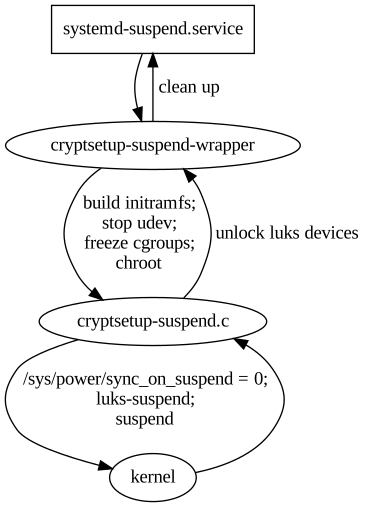
cryptsetup-suspend: A C program that takes a list of LUKS devices as arguments, suspends them vialuksSuspendand suspends the system afterwards. Also, it tries to reserve some memory for decryption, which we'll explain below.cryptsetup-suspend-wrapper: A shell wrapper script which works the following way:- Extract the initramfs into a ramfs
- Run (systemd) pre-suspend scripts, stop udev, freeze almost all cgroups
- Chroot into the ramfs and run
cryptsetup-suspend - Resume initramfs devices inside chroot after resume
- Resume non-initramfs devices outside chroot
- Thaw groups, start udev, run (systemd) post-suspend scripts
- Unmount the ramfs
- A systemd unit drop-in file overriding the
Execproperty ofsystemd-suspend.serviceso that it invokes the scriptcryptsetup-suspend-wrapper.
Reusing large parts of the existing cryptsetup-initramfs implementation has some positive side-effects: Out-of-the-box, we support all LUKS block device setups that have been supported by the Debian cryptsetup packages before.
Freezing most processes/cgroups is necessary to prevent possible race-conditions and dead-locks after the system resumes. Processes will try to access data on the locked/suspended block devices eventually leading to buffer overflows and data loss.
Technical challenges and caveats
- Dead-locks at suspend: In order to prevent possible dead-locks between suspending the encrypted LUKS disks and suspending the system, we have to tell the Linux kernel to not
sync()before going to sleep. A corresponding patch got accepted upstream in Linux 5.6. See section What about the kernel patch? below for details. - Race conditions at resume: Likewise, there's a risk of race conditions between resuming the system and unlocking the encypted LUKS disks. We went with freezing as many processes as possible as a counter measurement. See last part of section State of the implementation: where are we? for details.
- Memory management: Memory management is definitely a challenge. Unlocking disks might require a lot of memory (if key derivation function is argon2i) and the swap device most likely is locked at that time. See section All that matters to me is the memories! below for details.
- systemd dependency: Our implementation depends on systemd. It uses a unit drop-in file for
systemd-suspend.servicefor hooking into the system suspend process and depends on systemds cgroup management to freeze and thaw processes. If you're using a different init system, sorry, you're currently out of luck.
What about the kernel patch?
The problem is simple: the Linux kernel suspend implementation enforces a final filesystem sync() before the system goes to sleep in order to prevent potential data loss. While that's sensible in most scenarios, it may result in dead-locks in our situation, since the block device that holds the filesystem is already suspended. The fssync() call will block forever as it waits for the block device to finish the sync() operation. So we need a way to conditionally disable this sync() call in the Linux kernel resume function. That's what our patch does, by introducing a run-time switch at /sys/power/sync_on_suspend, but it only got accepted into the Linux kernel recently and was first released with Linux kernel 5.6.
Since release 4.3, the Linux kernel at least provides a build-time flag to disable the sync(): CONFIG_SUSPEND_SKIP_SYNC (that was called SUSPEND_SKIP_SYNC first and renamed to CONFIG_SUSPEND_SKIP_SYNC in kernel release 4.9). Enabling this flag at build-time protects you against the dead locks perfectly well. But while that works on an individual basis, it's a non-option for the distribution Linux kernel defaults. In most cases you still want the sync() to happen, except if you have user-space code that takes care of the sync() just before suspending your system - just like our cryptsetup-suspend implementation does.
So in order to properly test cryptsetup-suspend, you're strongly advised to run Linux kernel 5.6 or newer. Fortunately, Linux 5.6 is available in buster-backports thanks to the Debian Kernel Team.
All that matters to me is the memories!
One of the tricky parts is memory management. Since version 2, LUKS uses argon2i as default key derivation function. Argon2i is a memory-hard hash function and LUKS2 assigns the minimum of half of your systems memory or 1 GB to unlocking your device. While this is usually unproblematic during system boot - there's not much in the system memory anyway - it can become problematic when suspending. When cryptsetup tries to unlock a device and wants 1 GB of memory for this, but everything is already occupied by your browser and video player, there's only two options what to do:
- Kill a process to free some memory
- Move some of the data from memory to swap space
The first option is certainly not what you expect when suspending your system. The second option is impossible, because swap is located on your harddrive which we have locked before. Our current solution is to allocate the memory after freezing the other processes, but before locking the disks. At this time, the system can still move data to swap, but it won't be accessed anymore. We then release the memory just in time for cryptsetup to claim it again. The implementation of this is still subject to change.

What's missing: A proper user interface
As mentioned before, we consider cryptsetup-suspend usable, but it certainly still has bugs and shortcomings. The most obvious one is lack of a proper user interface. Currently, we switch over to a tty command-line interface to prompt for passphrases when unlocking the LUKS devices. It certainly would be better to replace this with a graphical user interface later, probably by using plymouth or something alike. Unfortunately, it seems rather impossible to spawn a real graphical environment for the passphrase prompt. That would imply to load the full graphical stack into the ramfs, raising the required amount of memory significantly. Lack of memory is currently our biggest concern and source of trouble.
We'd definitely appreciate to learn about your ideas how to improve the user experience here.
Let's get practical: how to use
TL;DR: On Debian Bullseye (Testing), all you need to do is to install the cryptsetup-suspend package from experimental. It's not necessary to upgrade the other cryptsetup packages. On Debian Buster, cryptsetup packages from backports are required.
- First, be sure that you're running Linux kernel 5.6 or newer. For Buster systems, it's available in buster-backports.
- Second, if you're on Debian Buster, install the cryptsetup 2:2.3.3-2~bpo10+1 packages from buster-backports.
- Third, install the
cryptsetup-suspendpackage from experimental. Beware thatcryptsetup-suspenddepends oncryptsetup-initramfs (>= 2:2.3.3-1~). Either you need the cryptsetup packages fromtesting/unstable, or the backports frombuster-backports. - Now that you have the
cryptsetup-suspendpackage installed, everything should be in place: Just send your system to sleep. It should switch to a virtual text terminal before going to sleep, ask for a passphrase to unlock your encrypted disk(s) after resume and switch back to your former working environment (most likely your graphical desktop environment) afterwards.
Security considerations
Suspending LUKS devices basically means to remove the corresponding encryption keys from system memory. This protects against all sort of attacks trying to read them from there, e.g. cold-boot attacks. But, cryptsetup-suspend only protects the encryption keys of your LUKS devices. Most likely there's more sensitive data in system memory, like all kinds of private keys (e.g. OpenPGP, OpenSSH) or documents with sensitive content.
We hope that the community will help improve this situation by providing useful pre-/post-suspend scripts. A positive example is KeepassXC, which is able to lock itself when going to suspend mode.
Related and similar projects
- Systemd Homed: systemd recently got a new feature to manage home directories. It brings support for encrypting your home directory within a LUKS2 container and for suspending the LUKS2 container during system sleep. It all is limited to systemd home directories though and doesn't help with other LUKS devices.
- There's several earlier
luks-suspend-*implementations. Unfortunately, neither of them deal with all the Technical challenges and caveats we discovered. Still we'd like to mention some of them: - debian-luks-suspend
- go-luks-suspend
- arch-luks-suspend
Links
- Our Linux kernel patch: https://git.kernel.org/pub/scm/linux/kernel/git/torvalds/linux.git/commit/?id=c052bf82c6b00ca27aab0859addc4b3159dfd3a4
- The
debian/experimentalbranch of our Debian cryptsetup packaging repository, containingcryptsetup-suspendrelated changes: https://salsa.debian.org/cryptsetup-team/cryptsetup/-/tree/debian/experimental cryptsetup-suspendmanpage: https://salsa.debian.org/cryptsetup-team/cryptsetup/-/blob/debian/experimental/debian/doc/cryptsetup-suspend.xml
Feedback and Comments
We'd be more than happy to learn about your thoughts on cryptsetup-suspend. For specific issues, don't hesitate to open a bugreport against cryptsetup-suspend. You can also reach us via mail - see the next section for contact addresses. Last but not least, comments below the blogpost work as well.
Authors
- Tim (tim at systemli.org)
- Jonas (jonas at freesources.org)
Switching from Gnome to a tiling window manager
After having thought about it since "forever", I finally decided to switch to a tiling window manager. I went with sway since it runs on wayland and since it seems to be the recommended "wayland version of i3", a tiling window manager that many of my tech friends use ;)
After a few days of using sway, I'm pretty sure that I won't switch back anytime soon. It feels super convenient to have all windows tiled on the screen and being able to rearrange and resize them easily with a few keyboard shortcuts.
There's still some things that didn't work instantly, so I'll try to document them here in hope that it's useful to others. Feedback welcome!
This blog post covers the following topics:
- Install sway on Debian Buster
- Basic sway configuration
- Picking an application launcher
- Configure the status bar
- Configure notification daemon
- Preserve working directory in new terminal instances
- Use gnome-keyring as SSH agent with sway
- What's missing
Install sway on Debian Buster
I run Debian Buster on my work machine. The sway components aren't available in Buster or buster-backports yet, so I went with installing the packages from Unstable or experimental manually. I'll probably help with backporting them to buster-backports once I settled on using sway.
Lucky enough, sway packages only bring one dependency that's not satisfied
in Buster, which is libjson-c4. So for now, to install the sway Debian
packages on Buster, you have to do the following:
mkdir ~/devel/sway && cd ~/devel/sway

wget http://ftp.de.debian.org/debian/pool/main/w/wlroots/libwlroots3_0.7.0-2_amd64.deb
wget http://ftp.de.debian.org/debian/pool/main/s/scdoc/scdoc_1.10.0-1_amd64.deb
wget http://ftp.de.debian.org/debian/pool/main/s/swaybg/swaybg_1.0-2_amd64.deb
wget http://ftp.de.debian.org/debian/pool/main/s/swaylock/swaylock_1.4-1_amd64.deb
wget http://ftp.de.debian.org/debian/pool/main/s/swayidle/swayidle_1.5-1_amd64.deb
wget http://ftp.de.debian.org/debian/pool/main/s/sway/sway-backgrounds_1.2-1_all.deb
wget http://ftp.de.debian.org/debian/pool/main/j/json-c/libjson-c4_0.13.1+dfsg-6_amd64.deb
wget http://ftp.de.debian.org/debian/pool/main/s/sway/sway_1.2-1_amd64.deb

apt install ./libwlroots3_0.7.0-2_amd64.deb ./scdoc_1.10.0-1_amd64.deb ./swaybg_1.0-2_amd64.deb ./swaylock_1.4-1_amd64.deb ./swayidle_1.5-1_amd64.deb ./sway-backgrounds_1.2-1_all.deb ./libjson-c4_0.13.1 ./sway_1.2-1_amd64.deb

# Install dunst, i3status and dmenu
apt install dunst i3status suckless-tools

# Install brightnessctl (for controlling the screen backlight) and
# blueman (for bluetooth management)
apt install brightnessctl brightness-udev blueman
Basic sway configuration
Sway brings a good basic configuration at /etc/sway/config. In order to
customize it, copy the file over to ~/.config/sway/config. First things
I changed were the following:
# Disable windows title bars
default_border pixel

# Use tilix wrapper as terminal emulator (more on that later)
set $term ~/.config/sway/scripts/tilix-wrapper.sh

# My internal laptop screen
set $laptop_screen eDP-1

# Command to lock screen
set $lock 'swaylock -F -f -e -K -l -c 000000'

# Default wallpaper
output * bg ~/Pictures/favourite_background.jpg fill

# Idle configuration
exec swayidle -w \
         timeout 300 $lock \
         timeout 600 'swaymsg "output * dpms off"' \
         resume 'swaymsg "output * dpms on"' \
         before-sleep $lock

# Internal Thinkpad Keyboard
input "1:1:AT_Translated_Set_2_keyboard" {
    xkb_layout de,us
    # Change keyboard layouts on <Super>+<Space>
    xkb_options grp:win_space_toggle
}

# Cherry Keyboard
input "1130:275:Cherry_GmbH_CHERRY_Wired_Keyboard" {
    xkb_layout de,us
    # Change keyboard layouts on <Super>+<Space>
    xkb_options grp:win_space_toggle
}

# Internal Thinkpad Touchscreen
input "2:7:SynPS/2_Synaptics_TouchPad" natural_scroll "enabled"

# Status Bar
bar {
    position top
    # Use i3status as status bar
    status_command i3status
}

# Custom key bindings

# Lock screen
bindsym $mod+Escape exec $lock

# Audio and brightness key bindings
bindsym XF86AudioRaiseVolume exec pactl set-sink-volume @DEFAULT_SINK@ +5%
bindsym XF86AudioLowerVolume exec pactl set-sink-volume @DEFAULT_SINK@ -5%
bindsym XF86AudioMute exec pactl set-sink-mute @DEFAULT_SINK@ toggle
bindsym XF86AudioMicMute exec pactl set-source-mute @DEFAULT_SOURCE@ toggle
bindsym XF86MonBrightnessDown exec brightnessctl set 5%-
bindsym XF86MonBrightnessUp exec brightnessctl set +5%
bindsym XF86AudioPlay exec playerctl play-pause
bindsym XF86AudioNext exec playerctl next
bindsym XF86AudioPrev exec playerctl previous

# Bindings for Firefox and Thunderbird
bindsym $mod+Shift+b exec "env MOZ_ENABLE_WAYLAND=1 firefox"
bindsym $mod+Shift+m exec "thunderbird"

# Autostart

# Start dunst, a notification daemon
exec dunst

# Start some programs in fixed worspaces
assign [app_id="firefox"] → 1
exec "env MOZ_ENABLE_WAYLAND=1 firefox"
assign [class="thunderbird"] → 2
exec "thunderbird"
Picking an application launcher
The default application launcher to be used is dmenu (from suckless-tools). While it works okayish, I don't particularly like it. In my eyes, it looks rather old-fashioned, and even worse, it doesn't seem to have support for freedesktop.org desktop entries.
I looked around a bit and wofi sounded pretty promising. It's not in Debian yet but was easy to compile. A big downer though is that it depends on a newer libglib2.0 version (2.60) than in Debian Buster. I still compiled it in a Bullseye schroot and got a first impression. I like it's look and feel (after a bit CSS customization) and probably I'll go with packaging it for Debian.
For the moment, I'm stuck with dmenu on my working system, though.
Update: I packaged wofi in the meantime and decided to install libglib2.0 from Bullseye to fullfill its dependencies. So I'm running wofi now and I'm very happy with it so far.
Fore reference, here's my wofi config file (~/.config/wofi/config):
mode=drun
colors=colors
filter_rate=100
And my custom wofi stylesheet (~/.config/wofi/style.css):
window {
    margin: 5px;
    #border: 2px solid #282C34;
    #border: 2px solid blue;
    #background-color: #282C34;
    #background-color: #282C34;
    background-color: transparent;
}

#input {
    margin-left: 70px;
    margin-right: 70px;
    margin-top: 10px;
    margin-bottom: 10px;
    border: 2px solid blue;
    #border: 2px solid #777D87;
    border: 2px solid grey;
    #background-color: #E5C07B;
    #background-color: #282C34;
    background-color: darkgrey;
}

#scroll {
    margin: 5px;
    #border: 2px solid #282C34;
    border: 2px solid #61AFEF;
    #background-color: #777D87;
    #background-color: #ABB2BF;
    background-color: #282C34;
}

#inner-box {
    margin: 20px;
}

#text {
    margin: 5px;
    color: #E5C07B;
}
Configure the status bar
I decided to go with the i3status status bar and it serves my purposes
pretty well. Here's my config (/.config/i3status/config):
# i3status configuration file.
# see "man i3status" for documentation.

# It is important that this file is edited as UTF-8.
# The following line should contain a sharp s:
# ß
# If the above line is not correctly displayed, fix your editor first!

general {
        #colors = true
        colors = false
        interval = 5
}

order += "load"
order += "wireless _first_"
order += "ethernet _first_"
order += "path_exists VPN"
order += "battery all"
order += "tztime local"

# Customized wireless status
wireless _first_ {
        format_up = "W: (%quality at %essid) %ip"
        format_down = "W: down"
}

# Only show ethernet status when connected
ethernet _first_ {
        # if you use %speed, i3status requires root privileges
        format_up = "E: %ip"
        format_down = ""
}

# Display VPN status
path_exists VPN {
        # path exists when a VPN tunnel launched by nmcli/nm-applet is active
        path = "/proc/sys/net/ipv4/conf/tun0"
}

# Customized battery status
battery all {
        format = "%status %percentage"
        status_chr = "⚡"
        status_bat = "🔋"
        status_full = "☻"
}

# Localized time format
tztime local {
        #format = "%Y-%m-%d %H:%M:%S"
        format = "%a %d. %b %Y %H:%M"
}

load {
        format = "L: %1min"
}
Configure a notification daemon
I'm really used to getting notifications by my chat programs (XMPP, IRC, Signal), and I don't want to dismiss this. So I installed dunst and configured sway to auto-start it (see above). That's it, it worked instantly. Well, that was easy :)
Preserve working directory in new terminal instances
One thing that really annoyed me after switching to sway was, that the working directory wasn't preserved when spawning new terminal instances. I often open five or more terminal instances in parallel when working on a complex project, and I'm very used to just open a new terminal and continue working in the same directory there immediately.
So I was really eager to find a solution here. Turned out that it's not that easy and needs a bit of dirty scripting, but I found a solution (with help from some nice folks in #sway on Freenode).
First some words about the problem: spawning a new terminal in sway doesn't use whatever sophisticated means to spawn new instances of the same terminal process. Instead, it just spawns a fresh process of your favourite terminal emulator. While I really like tilix and used it as a tiling terminal emulator, I no longer want to use it's tiling features when I now have a tiling window manager. I'll stick for tilix for now as I like its look and feel, though.
So if the new terminal emulator process doesn't know about the working directory of your former terminal, what to do about it?
The solution: Luckily, it's possible to identify the PID of your focused
window in sway using swaymsg -t get_tree. In case that the focused
window is a terminal emulator, it's parent ID should be your shell. And
the shells PWD can easily be determined by reading the symlink
/proc/$PID/cwd.
So let's put this in a wrapper script under
~/.config/sway/scripts/tilix-wrapper.sh:
#!/bin/sh

# Small script that tries to determine the PWD of the focused terminal
# (in sway tiling window manager) and pass it to the newly spawned one.

TERMINAL_CMD="tilix --new-process"

FOCUSED_PID=""
if [ ! type jq 2>/dev/null ]; then
    echo "ERROR: jq not installed" >&2
else
    FOCUSED_PID="$(swaymsg -t get_tree | jq '.. | select(.type?) |
        select(.type=="con") | select(.focused==true).pid')"
fi

FOCUSED_PWD=""
# Check if $FOCUSED_PID is an integer
if [ "$FOCUSED_PID" -eq "$FOCUSED_PID" 2>/dev/null ]; then
    FOCUSED_PPID="$(ps -o pid= --ppid "$FOCUSED_PID" | awk '{print $1}')"
    if [ "$FOCUSED_PPID" -eq "$FOCUSED_PPID" 2>/dev/null ]; then
        FOCUSED_PWD="$(readlink "/proc/$FOCUSED_PPID/cwd")"
    fi
fi

# Spawn terminal in background
if [ -d "$FOCUSED_PWD" ]; then
    $TERMINAL_CMD --working-directory="$FOCUSED_PWD" $@ &
else
    $TERMINAL_CMD $@ &
fi
Finally, we have to set the script as $term in sways config (see
above). Yay, now I've a solution to preserve my working directory when
spawning new terminals!
Use gnome-keyring as SSH agent with sway
Another super annoying thing was that my SSH agent no longer worked with sway, mostly because I used gnome-keyring before and it wasn't spawned automatically when starting sway. So let's change that. I found it a bit complicated to get this working as docs on the internet said a lot of different things, but in the end, the following worked.
Since I still use gdm3 as desktop manager, gnome-keyring-daemon is started
automatically during login. So the only thing that's missing is to initalize
the gnome-keyring-daemon when starting a terminal. To do so, add the following
to ~/.profile (in order to only do it on a login shell):
# Connect to and initalize gnome-keyring-daemon when in sway session
if [ "$DESKTOP_SESSION" = "sway" ]; then
    export $(gnome-keyring-daemon --start)
fi
What's missing
- I want to start profanity (XMPP client) and irssi (IRC client) automatically
in workspace 3, but so far I failed to find a working filter for sways
assignfeature to identify tilix instances with profanity/irssi (in order to automatically assign those terminals to workspace 3). - I miss the redshift feature of gnome 3. redshift itself doesn't support wayland yet. There's a fork with wayland support, but I didn't find time to look into it yet.
- I'll probably switch from i3status to py3status soon as it's list of modules looks really promising.
Debian LTS report for October 2019
This month I was allocated 0 hours and carried over 14.5 hours from August. Unfortunately, once again I didn't find time to work on LTS issues. Since I expect it to stay that way for a few more months, I set the limit of hours that I get allocated to 0 last month already. I'll give back the remaining 14.5 hours and continue with LTS work once I again have some spare cycles to do so.
Links
Debian LTS report for September 2019
This month I was allocated 10 hours and carried over 9.5 hours from August. Unfortunately, again I didn't find much time to work on LTS issues, partially because I was travelling. I spent 5 hours on the task listed below. That means that I carry over 14.5 hours to October.
- Issued DLA 1921-1 for CVE-2019-14513/dnsmasq.
Links
Debian LTS report for August 2019
This month I was allocated 10 hours. Unfortunately, I didn't find much time to work on LTS issues, so I only spent 0.5 hours on the task listed below. That means that I carry over 9.5 hours to September.
- Triaged CVE-2019-13640/qbittorrent: After digging through the code, it became obvious that qbittorrent 3.1.10 in Debian Jessie is not affected by this vulnerability as the affected code is not present yet.
Links
Debian LTS report for July 2019
This month I was allocated 17 hours. I also had 2 hours left over from Juney, which makes a total of 19 hours. I spent all of them on the following tasks/ issues.
- DLA-1843-1: Fixed CVE-2019-10162 and CVE-2019-10163 in pdns.
- DLA-1852-1: Fixed CVE-2019-9948 in python3.4. Also found, debugged and fixed several further regressions in the former CVE-2019-9740 patches.
- Improved testing of LTS uploads: We had some internal discussion in the Debian LTS team on how to improve the overall quality of LTS security uploads by doing more (semi-)automated testing of the packages before uploading them to jessie-security. I tried to summarize the internal discussion, bringing it to the public debian-lts mailinglist. I also did a lot of testing and worked on Jessie support in Salsa-CI. Now that salsa-ci-team/images MR !74 and ci-team/debci MR !89 got merged, we only have to wait for a new debci release in order to enable autopkgtest Jessie support in Salsa-CI. Afterwards, we can use the Salsa-CI pipeline for (semi-)automatic testing of packages targeted at jessie-security.
Links
Debian LTS report for June 2019
This month I was allocated 17 hours. I also had 1.75 hours left over from May, which makes a total of 18.75 hours. I spent 16.75h of them on the following issues, which means I again carry over 2h to the next month.
- DLA 1817-1: Uninitialized read in XBM support of libgd2. Related CVE: CVE-2019-11038.
- Work on sqlite3 security update: Spent quite some time on working on two CVEs (CVE-2019-8457 and CVE-2019-5827) that are not easy to fix. Suggested to ignore CVE-2019-8457 and prepared packages that contain a (likely incomplete) fix for CVE-2019-5827.
- DLA 1837-1: Several vulnerabilities in the rdesktop RDP client.
- DLA 1837-2: Regression update for the 1.8.6-0+deb8u1 rdesktop upload.
Links
Debian LTS report for May 2019
This month I was allocated 17 hours. I spent 15.25 hours on the following issues:
- DLA 1766-1: OpenPGP signature spoofing in evolution. On this issue I actually spent way more time than expected during April. I took over some of the remaining hours to May.
- DLA 1778-1: Several vulnerabilities in symfony, a PHP web application framework.
- DLA 1791-1: Several vulnerabilities in drupal7, a PHP web site platform.
Links
Debian LTS report for April 2019
After a longer break (~two years) I again took part in the funded Debian LTS project in April 2019.
I was allocated 14 hours and spent all of them (and even a bit more) on the following two issues:
- DLA 1748-1: Several security fixes for apache2
- DLA 1766-1: OpenPGP signature spoofing in evolution
Links
This blog is powered by ikiwiki.